> ## Documentation Index
> Fetch the complete documentation index at: https://statsig-4b2ff144-mintlify-add-local-eval-country-note-96362.mintlify.site/llms.txt
> Use this file to discover all available pages before exploring further.
# Event Filtering
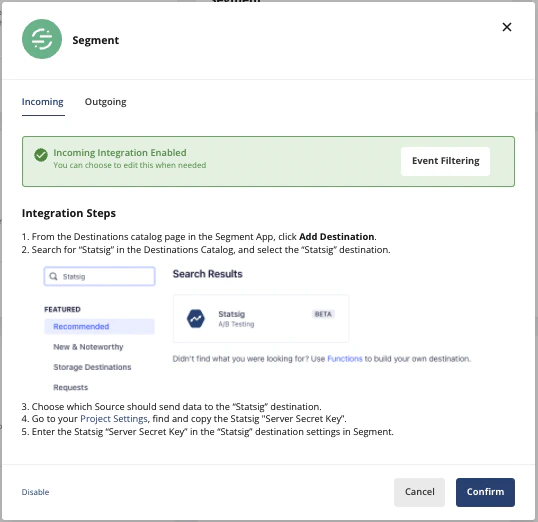
Once you've enabled an integration, you can select specific events that you want to send and/or receive by clicking on the **Event Filtering** button.
The steps outline below are for the Segment integration, but the steps to enable **Event Filtering** are the same across integrations.
## Incoming Event Filtering
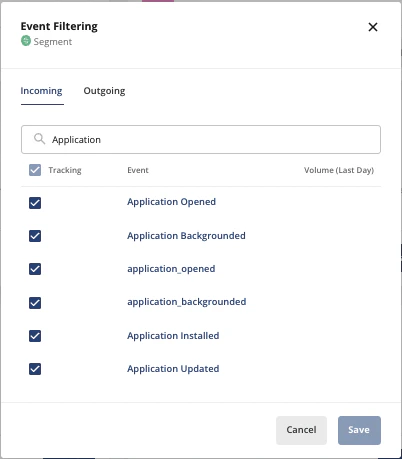
If your integration includes "Incoming" events, you can filter which ones Statsig should care about. All others will not be logged.
* Visit the [integrations](https://console.statsig.com/integrations) page on console.statsig.com.
* Select the integration you wish to filter events for.
* In the dialog that appears, select "Event Filtering"
 * You can now search for specific events and select or deselect the events that you want Statsig to ingest.
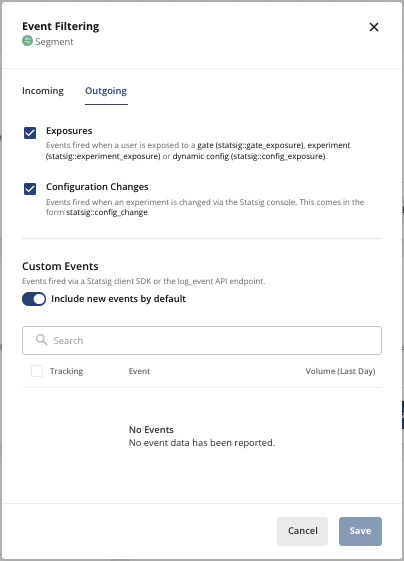
 ## Outgoing Event Filtering
If your integration includes "Outgoing" events, you can select which ones being sent to Statsig should then be forwarded to the integration.
* Visit the [integrations](https://console.statsig.com/integrations) page on console.statsig.com.
* Select the integration you wish to filter events for.
* In the dialog that appears, select "Event Filtering"
## Outgoing Event Filtering
If your integration includes "Outgoing" events, you can select which ones being sent to Statsig should then be forwarded to the integration.
* Visit the [integrations](https://console.statsig.com/integrations) page on console.statsig.com.
* Select the integration you wish to filter events for.
* In the dialog that appears, select "Event Filtering"